 Fordee
Audio Effector: Mimic
Mirrors, kaleidoscopes, Droste spirals, and tunnel zooms that move to your music.
$59.99
Checkout and licensing handled by Herbistry.
About
Fold your footage into symmetry, then make it move to the music. Pick a clean single mirror, a four-way split, or a kaleidoscope with up to 32 wedges, and bend it further with recursive Droste spirals, liquid-mirror ripples, or an infinity tunnel that pulls the image into depth. Load a song or set a BPM and the whole look reacts: tell it what to follow, the beat or the loudness, bass, mid, or treble, and the mirrors spin, pulse, and reconfigure in time with the track. Twelve presets to start from, plus a Classic mode for pure hand-driven symmetry when you just want the static look.
The looks stack, so a kaleidoscope folded through a Droste spiral, or a quad snap pulled down an infinity tunnel, gets you something no single mirror can. A Pattern engine sets how the folds move on the beat, from a slow drift to hard snaps to full chaos, and Auto-Cycle can rotate through them on its own so the look never sits still. Four extra effects ride on top: a strobe, an RGB split, a glitch tear, and a bloom that flashes on the hits. Drop it on one clip, or use the Title version over a whole run of cuts so the beat grid stays continuous across every edit. Real-time on Apple Silicon, in Final Cut Pro and Motion.
An FxPlug effect and Title for Final Cut Pro and Motion. Drop the effect on a single clip to fold that shot, or drop the Title on a layer above a run of clips to fold all of them at once with one continuous beat grid. It reads WAV, MP3, M4A, AAC, AIFF, CAF, and FLAC audio, or anything else your Mac can play.
macOS 13.5 (Ventura) or later · Apple Silicon Mac (M1 or newer) · Final Cut Pro 10.8.1 or Motion 5.8 (or later)
Walkthrough
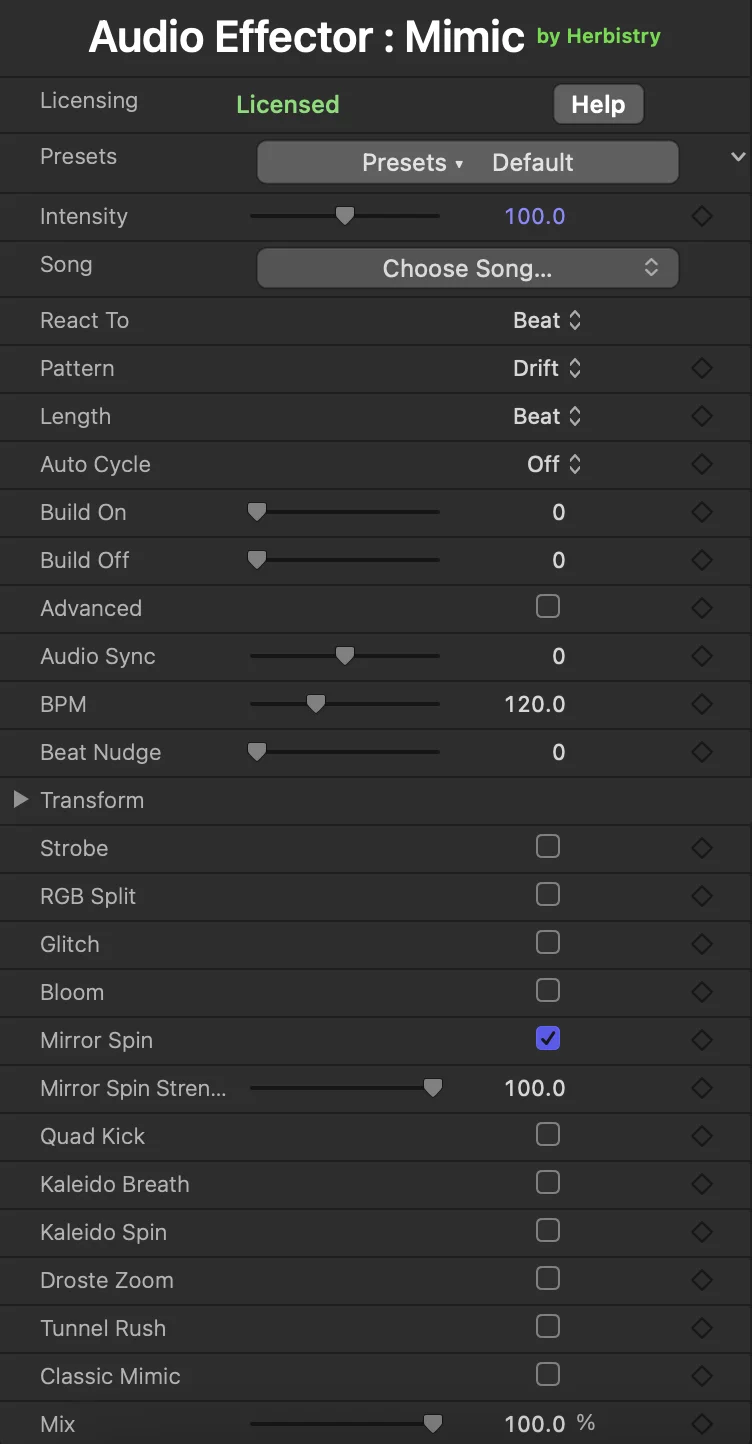
Everything in one inspector
What it does
One effect, six ways to fold the frame, and a beat engine driving all of it.
Six ways to fold the frame
A clean single mirror, a four-way quad, two kaleidoscopes (one that breathes its wedge count, one that spins them), a recursive Droste spiral, and an infinity tunnel. They're separate switches, so run one or stack several at once.
Reacts to your actual song
Load a track and tell it what to follow: the beat, or the loudness, bass, mid, or treble. The mirrors spin, kick, and reconfigure in time with the music, hitting harder on a loud passage and easing off in a quiet one.
No song? It still moves
No music in the project, or you just want a vibe? Set a BPM and the folds move to the beat on their own. Nudge the beat until the hits land where you want them.
A beat engine, not just a switch
A Pattern engine sets the character of the motion, from a slow drift to hard snaps to full chaos, and Length sets how often it reconfigures. Auto-Cycle rotates through the patterns on the beat so the look keeps evolving on its own.
Twelve presets, then make it yours
One-click looks from clean mirrors to full-psychedelic Droste tunnels. Start on a preset, then every switch is right there, plus four extra effects (strobe, RGB split, glitch, bloom) to layer on top.
Classic mode for the static look
Want the symmetry without the music? Flip on Classic Mimic for a pure hand-driven rig: pick a mirror, quad, or kaleidoscope, add a Droste or tunnel warp, and animate it on its own clock. No song required.
Common questions
Is there a free trial?
Yes, and it's the real deal, not a locked-down demo. Download it, drop it on a clip, and every look, effect, and preset works with no time limit. The only catch is a small watermark sitting over the output so you know you're on the trial. Add a license key and it's gone, and your exports come out clean.
Is it a clip effect or a Title?
Both, and you pick based on what you're cutting. The effect drops on a single clip and folds that shot. The Title version sits on a layer above a run of clips and folds everything under it, with one song and one set of settings, so the beat grid stays continuous across every cut. One clip, use the effect. A montage cut to a track, use the Title.
Do I need a song in my project?
Nope. Load a song and the mirrors react to it, following the beat or a band you pick. No song? Set a BPM and it folds to the beat on its own. Either way you get a moving, reacting look, no audio required.
What do I get when I buy?
A license key. There's just one download, the same trial you already have, and the key unlocks it into the full version. No second installer, no separate pro file to hunt down. Enter the key once and you're set.
Where's my license key, and what if I lose it?
It arrives by email in your receipt. Checkout is handled by Lemon Squeezy, so the receipt and the key come from them. Lost it? No drama. Sign in to that same Lemon Squeezy account with the email you bought with and your key and downloads are waiting. Check your spam folder before you panic. Open your Lemon Squeezy orders →
How do I activate it?
In Final Cut Pro or Motion, add Mimic to your timeline and open the inspector. Find the License panel, paste your key, and hit Activate. The watermark disappears and you're good. You only do it once, and it sticks. One purchase covers up to two of your own Macs, and you can deactivate an old one to free a slot.
Can I get a refund?
Because the free trial lets you try every look and effect before you spend a cent, license purchases are final. Take the trial for a proper spin first, that's exactly what it's there for. If something's actually broken, get in touch and I'll sort you out.
Get Audio Effector: Mimic
Audio Effector: Mimic for Final Cut Pro and Motion. Grab the free trial, build your look, then drop in a license key when you want clean exports.
Checkout and licensing handled by Herbistry.